Reviewing Payments
Use the activity management area to review Standard Checkout collections, participant payment status, organizer earnings, and scheduled payout tranches.
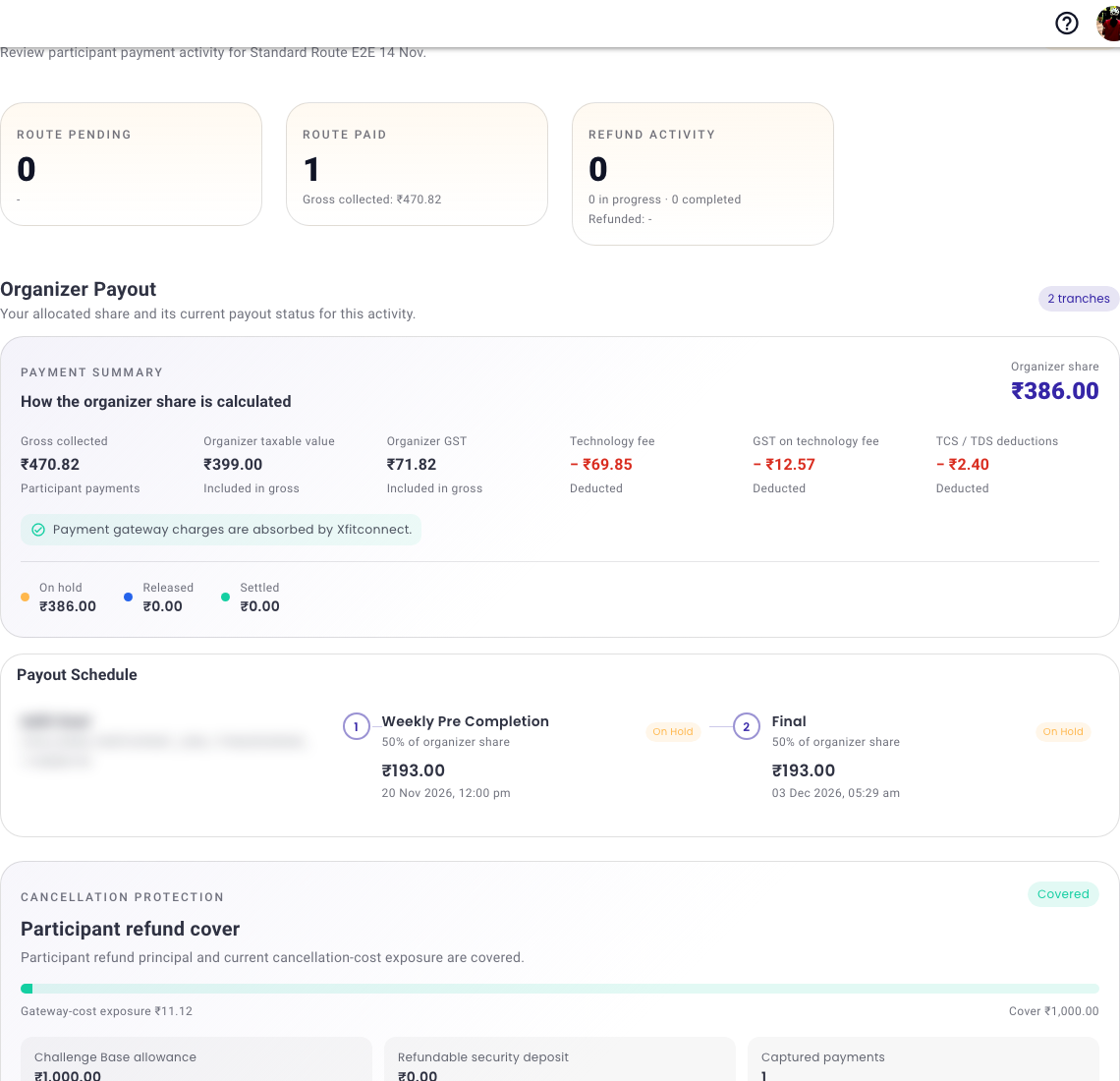
Read The Summary
- Participant paid is the completed order amount collected for the registration.
- Xfitconnect technology fee is the displayed service fee; payment processing is included in it.
- GST on the technology fee is the tax charged on Xfitconnect’s service.
- Statutory deductions are amounts withheld where the displayed tax rules apply.
- Estimated organizer payout is the remaining organizer amount before a later refund, recovery, or payout adjustment.
- Scheduled payout shows when an eligible portion is expected to be released. A payout can remain on hold until its scheduled date and required checks are complete.
Standard Checkout
For each paid registration, review:
- participant and order reference;
- selected package or category;
- participant amount and payment status;
- Xfitconnect technology fee and applicable GST;
- statutory deductions, where applicable;
- estimated organizer payout; and
- payout tranche, scheduled date, and status.
A payment can move through confirmation and accounting after the participant closes checkout.
- Confirming or pending: do not ask the participant to pay twice; refresh the saved order first.
- Succeeded or paid: the participant registration should be confirmed.
- Failed: the participant may retry using the available saved-payment action.
- Refund pending: a refund has started but is not yet complete.
- Refunded: the payment record reflects the completed refund.
Use the provided reconcile or support action if a successful provider payment remains unresolved.
Refunds and payout adjustments remain attached to the original order. A pending refund or recovery may delay or reduce an eligible current or future organizer payout.
Understand The Payout Schedule
One participant order may appear with more than one scheduled payout portion. Read the amounts and dates together; the rows are parts of the same organizer earnings, not duplicate participant payments. A status such as On hold means the amount has not yet been released.
The activity summary is an operational estimate. Use the downloadable accounting and statutory reports made available to authorized administrators for filing or reconciliation.
Approval Only
Approval Only has no participant payment to review. The organizer instead sees its upfront hosting capacity purchase and invoice, capacity used, and remaining participant places.
Existing Organizer-Managed Payments
For an existing activity that retains direct organizer payment:
- review uploaded proof;
- approve only a payment you have independently confirmed;
- reject incorrect or unclear proof; and
- handle the receipt and refund directly with the participant.
This legacy workflow does not mean that Xfitconnect received or settled the participant’s money.
If A Number Looks Wrong
Check the selected package or category, discount, GST treatment, registration mode, refund status, and any carried recovery before escalating. Quote the activity and order reference when contacting support. Do not send participant card details, OTPs, or banking credentials.