Payments And Receipts
Xfitconnect shows the seller, package or category, complete amount, tax treatment, and applicable refund terms before a Standard Checkout payment.
Standard Checkout
Standard Checkout is Xfitconnect’s supported online payment flow for new paid Challenges and Events. After successful payment:
- your Challenge participation or Event registration is confirmed;
- the payment status and provider reference are saved;
- a participant receipt or tax invoice is generated as applicable; and
- the document remains available from the registration or payment details.
Payment confirmation may arrive from the payment provider shortly after the checkout closes. Do not pay again while Xfitconnect is still confirming the first attempt. Reopen the activity and check the saved status before retrying.
Approval Only Challenges
Approval Only is an organizer approval flow, not a participant payment flow. Xfitconnect does not collect money, request payment proof, or issue a participant payment receipt in this mode. Any separate commercial arrangement communicated by the organizer remains outside Xfitconnect.
Existing Organizer-Managed Payments
Some existing activities may still instruct you to pay the organizer directly and upload proof. The organizer reviews the proof and is responsible for the payment, receipt, and refund. Confirm the recipient shown in your payment application before sending money.
What The Document Shows
A Standard Checkout participant document identifies:
- seller and activity;
- selected package or category;
- entry value before discount;
- discount, if applied;
- GST and other displayed charges, where applicable;
- final amount paid;
- payment reference; and
- document number and issue date.
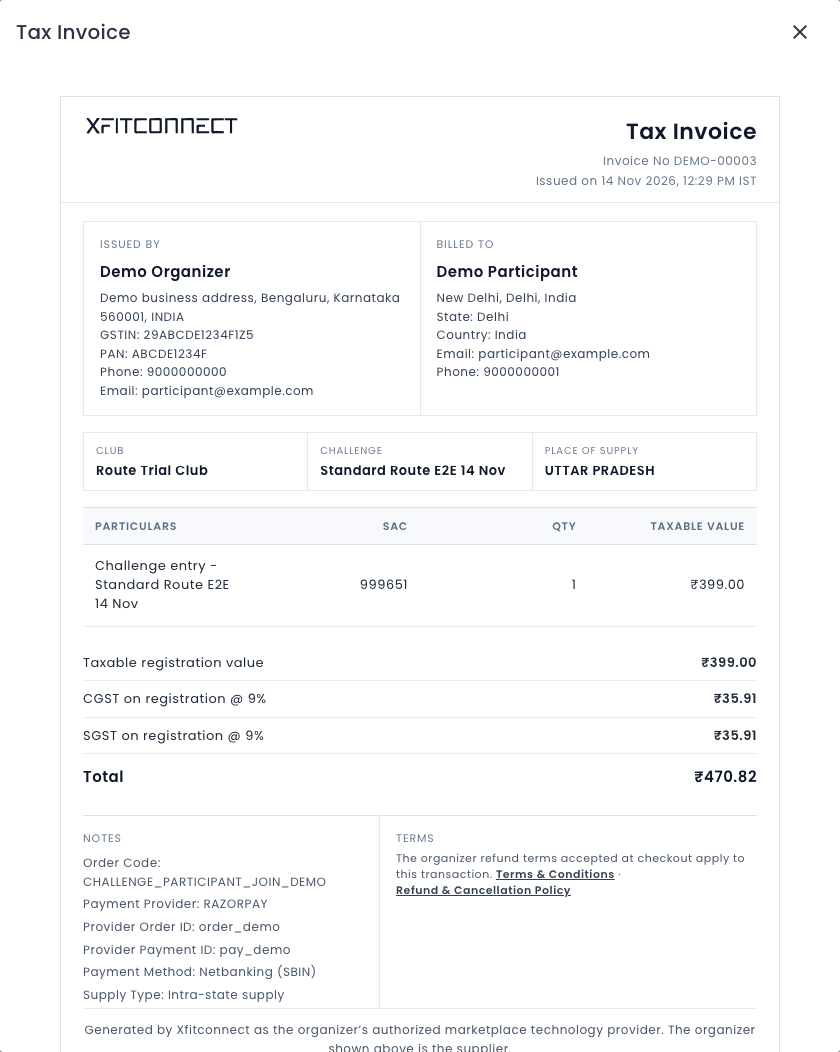
Download the document from Xfitconnect and keep it with the payment-provider confirmation. Contact the organizer first for questions about the activity, package, delivery, or eligibility. Use Xfitconnect support for an online payment status or document-generation problem.
If Payment Succeeded But Registration Is Pending
Do not start another payment immediately. Close the payment dialog if necessary, reopen the activity, and check the saved order. Confirmation can arrive shortly after checkout. If it remains unresolved, contact Xfitconnect support with the activity name and order or payment reference—never with card credentials or an OTP.
If A Document Is Missing Or Incorrect
Refresh the payment or registration details after confirmation. Check that the selected package or category and your billing details are correct. Contact the organizer for seller, package, or participant-detail corrections; contact Xfitconnect support if a confirmed Standard Checkout order has no downloadable document.