Why Your Garmin and Strava Data Don't Match
You press Stop on your Garmin watch as you reach your doorstep. You catch your breath, look down at your wrist, and smile: a clean 10K run completed in exactly 48 minutes and 15 seconds.
Then the activity syncs to Strava.
You open the app and see something different: 48 minutes and 40 seconds. Your average pace has changed, and the segment result you were expecting is nowhere to be found.
So what happened? Did 25 seconds vanish into thin air?
Not quite. You have run into one of the most common frustrations in connected fitness: different platforms often interpret the same workout differently. Garmin, Strava, and smartphone tracking apps are not always speaking the same data language.
That gap matters for everyday athletes. It matters even more when those activities feed a public fitness challenge, leaderboard, or team competition.
The Core Difference: Moving Time vs. Elapsed Time
The most common reason your Garmin and Strava numbers do not match is simple: platforms may calculate time differently.
Garmin is built around the device experience. If you pause your watch at a traffic light, stop for water, or rely on Auto Pause, Garmin generally treats that paused period as outside your active workout time. From Garmin’s perspective, the watch is the source of truth for the session you recorded.
Strava often takes a broader view. It receives the activity file and may recalculate parts of the effort using its own processing, especially when presenting community-facing results such as segments, leaderboards, and comparisons. If the uploaded data suggests you were still moving slightly, or if the activity contains pauses and GPS noise, Strava’s final numbers may differ from what your watch displayed.
That is why the same workout can produce two different versions of reality:
- Garmin is often closer to your device-recorded workout experience.
- Strava may reinterpret the activity for consistency across a larger community platform.
Neither system is necessarily wrong. They are optimizing for different things.
GPS Data Is Messier Than It Looks
Time is only part of the story. Distance and pace can also change because GPS data is never as clean as it appears on a polished activity map.
Every few seconds, your watch or phone estimates your position using satellite signals. In open areas, that estimate can be very good. But in the real world, athletes move through places that are difficult for GPS:
- dense tree cover
- high-rise buildings
- flyovers and underpasses
- narrow streets
- crowded event routes
- pockets, bags, or arm straps that block phone signal quality
When the GPS signal bounces, lags, or drops, your recorded path can drift away from where you actually moved. A straight route may become a jagged line. A smooth turn may become a sharp zigzag. In extreme cases, the activity can briefly place you on the wrong road or across a building.
That messy raw data then has to be cleaned.
Garmin and Strava Clean the Same Data Differently
Garmin devices can use hardware sensors such as accelerometers, gyroscopes, cadence data, and GPS readings together to estimate your movement. If the GPS signal jumps suddenly, the device may smooth the activity based on what it knows about your motion.
Strava receives the uploaded activity and applies its own processing. It may interpret the route, moving time, distance, and segments differently from the device that recorded the workout.
Small differences can quickly affect your final stats:
- Garmin may show
10.00 km; Strava may show9.92 km. - Garmin may show one moving time; Strava may calculate another.
- A tiny route correction can change average pace.
- Segment matching may fail if GPS drift moves your track away from the expected path.
This is why comparing screenshots between apps can feel so maddening. You are not always comparing two displays of the same calculation. You may be comparing two separate interpretations of the same underlying activity file.
Smartphone Tracking Can Be Even More Chaotic
Dedicated GPS watches are not perfect, but smartphone-only tracking can introduce even more variability.
Phones are often carried in pockets, bags, belts, or arm straps. They may reduce background GPS accuracy to save battery. They also have to share resources with calls, notifications, music, navigation, and other apps.
When phone tracking goes wrong, it can go very wrong. A single activity may show impossible route jumps, unrealistic pace spikes, or extra distance that the athlete clearly did not cover.
Here is a real example from an activity recorded on the Strava phone app. The route line jumps across roads, parks, and buildings, while some splits show physically impossible paces such as 48s/km, 44s/km, and 33s/km.
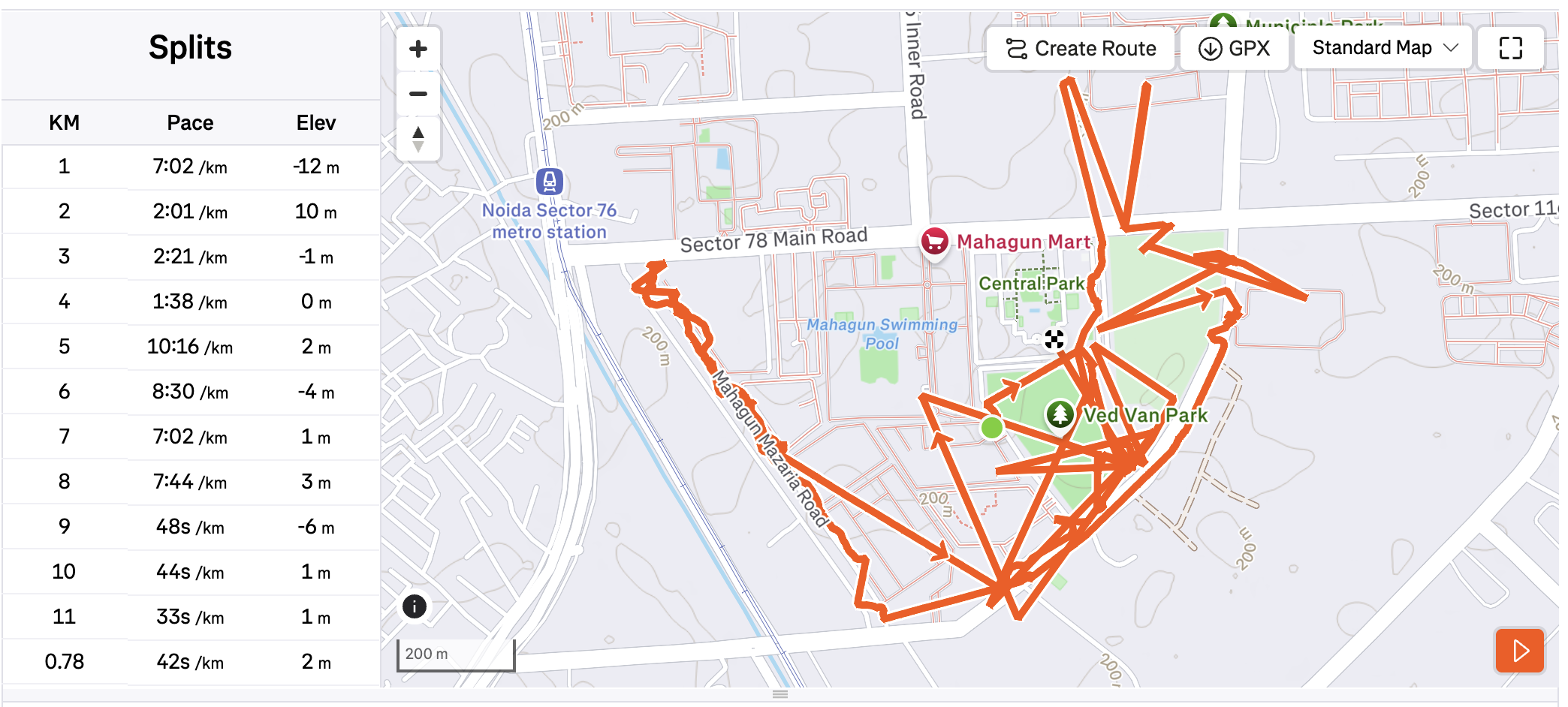
A real-world phone-tracked Strava activity where GPS drift inflated the route and created impossible split data.
For personal tracking, that is annoying.
For a fitness challenge, it can become a fairness problem.
If one glitched activity adds several impossible kilometers, the leaderboard can change in a way that feels unfair to everyone else. If a team challenge is close, one bad GPS file can distort the result.
That is the challenge with connected fitness data: the numbers look precise, but the underlying signal can be noisy.
Why This Matters for Fitness Challenges
In a solo workout, a mismatch between Garmin and Strava is frustrating but usually manageable. You know what you did, and you can move on.
In a group challenge, the stakes are different.
Participants expect the leaderboard to feel fair. Organizers need scoring that is consistent across devices, platforms, and activity types. A participant using Garmin should not feel penalized against someone using Strava. A phone-tracked GPS glitch should not overpower a week of honest effort from other participants.
That is exactly the data dilemma XfitConnect is built to handle.
How XfitConnect Approaches the Problem
XfitConnect does not pretend that raw fitness data is perfect. It is not.
Instead, our goal is to provide a fairer scoring layer across different sources such as Garmin, Strava, and app-recorded activities. When activities sync into a challenge, we do not want to rely blindly on one final summary number if the underlying data tells a more complicated story.
Where possible, XfitConnect looks deeper into the activity data, including split-level patterns, pace consistency, distance progression, and suspicious outliers.
In the example below, XfitConnect flags suspicious splits instead of treating the full synced distance as automatically valid. The athlete actually completed around 5 km, while the remaining distance came from GPS drift.
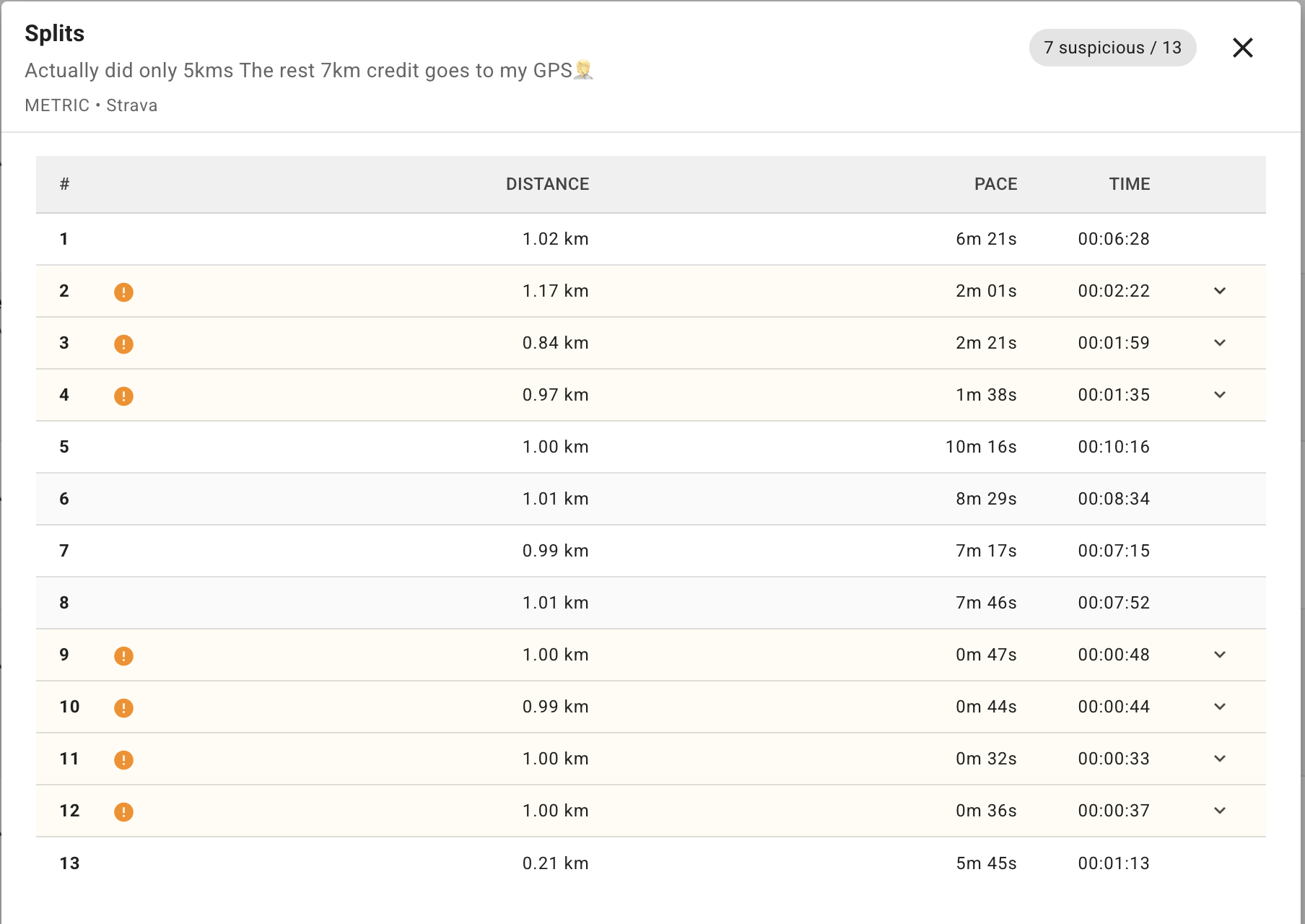
XfitConnect’s split-level view highlights suspicious sections so challenge scoring can avoid blindly accepting distorted GPS data.
That helps us identify problems such as:
- a single split with an impossible pace spike
- a GPS jump that inflates distance
- activity data that looks inconsistent with the rest of the workout
- summary totals that may not reflect the actual effort fairly
This is not magic, and it is not a solved problem. Fitness data varies across devices, apps, providers, routes, and athlete behavior. But a challenge platform should be honest about that complexity and keep improving how it handles it.
Our approach is simple: use the best available data, detect obvious anomalies, and keep the scoring system focused on fair competition rather than blind acceptance of noisy numbers.
What Athletes Can Do
You cannot control every algorithmic difference between Garmin and Strava, but you can reduce the chances of messy activity data.
A few practical habits help:
- record outdoor workouts with a dedicated GPS watch when possible
- wait for GPS lock before starting
- wear the device where it has a clear signal
- avoid starting activities indoors before moving outside
- review obviously glitched activities before submitting them to a challenge
- use one primary recording source instead of recording the same workout across multiple apps
These small choices make the data cleaner for you, your community, and your challenge organizer.
Let Your Performance Do the Talking
Garmin and Strava will not always agree. Your watch, your app, and your challenge leaderboard may each interpret the same activity through a slightly different lens.
That should not stop you from competing with your community.
At XfitConnect, we are continuously refining how we process activity data because real-world effort deserves a fair score. Whether you track with Garmin, Strava, or another connected source, the goal is the same: make fitness challenges more trustworthy, more inclusive, and more fun.
Ready to bring your fitness feeds into one fair challenge experience? Connect your Garmin or Strava account to XfitConnect and let your actual performance do the talking.